

How to Create AI Handbag Product Photography
AI-generated editorial cover illustrating handbag photography; the generic bag is conceptual, not the tested Fauvette product.
Create AI handbag product photography by defining the real bag’s silhouette, texture, hardware and strap arrangement before generating a scene. Compare every candidate with the original unit, and use a protected real product layer when the bag itself must remain unchanged.
AI Handbag Product Photography Needs a Product Identity Sheet
A handbag photograph needs to explain shape as well as surface. Record the model, color, material, dimensions, strap configuration, closure and visible accessories. Then decide whether the image is a catalog view, a detail, an interior view or a scene. Each role requires a reference that actually shows the relevant information.
Clara tested Fauvette Paris’s Joséphine Croco Chocolat: crocodile-embossed cowhide with a magnetic closure and decorative twisted gold-gilded ring. Official dimensions are 21 cm wide, 19 cm high and 7 cm deep; these are not measurements from generated pixels. [1]
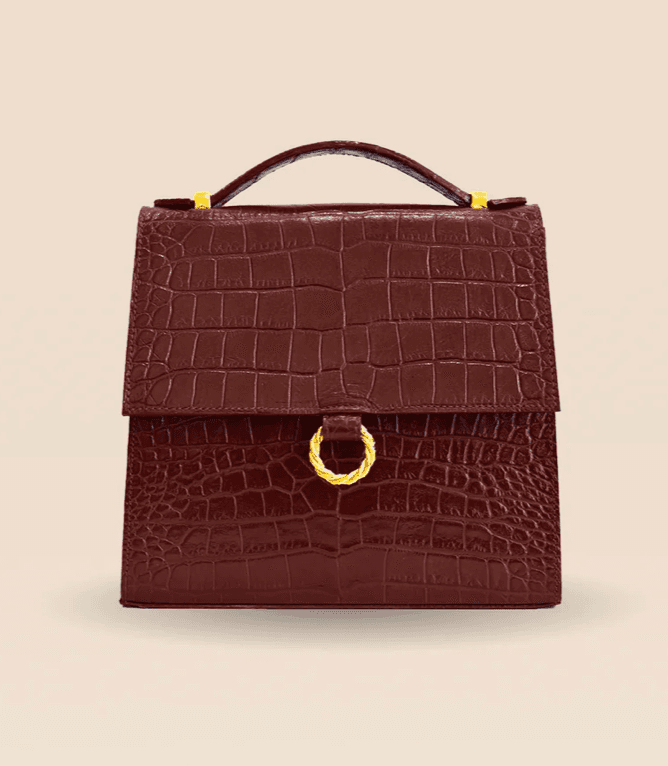
Figure 1. Original Joséphine Croco Chocolat reference used by Clara. This particular unit’s visible embossing is the comparison baseline.
The visible arch is an arranged adjustable strap, not a fixed short handle. Official strap lengths are 119–132 cm for crossbody carry, with an 81 cm shoulder-carry hole. The ring is decorative; opening uses a magnetic closure. [1]
Use permitted original photographs of the front, side, back, interior and hardware where those views are needed. For carry photographs, capture the real strap arrangement or provide a verified reference for that configuration. Do not infer a hidden strap attachment, pocket or lining from a front photograph.
Fauvette notes that cutting creates pattern differences between units. [1] Compare a generated derivative with its particular source unit; variation between physical bags does not justify arbitrary changes to that reference.
Build a Handbag Scene in Astorie
1. Create the project and preserve the source node
Choose New Project in Astorie, name it for the bag and shoot, then add an Image node. Upload the original bag photograph. Add a separate Image node for generation and connect the original image output to its image input. Astorie documents single-reference generation and result controls. [2, 3]
Clara’s first branch connected Image-29 to Image-30. Keep the original source available beside each candidate. Before another request, inspect the connected thumbnail rather than assuming the newest export is the input. If you want to compare a new background from the original, connect the original deliberately.
2. Set the frame and choose the recorded model label
The supplied panels show GPT Image 2.5 as the model label in Astorie, Flare mode, Extra high quality, Auto background, 1:1, the 2K option, PNG and one result. Both inspected exports are 2048 × 2048 pixels. These values document Clara’s setup; the UI label is not an independently verified provider API version.
For a catalog candidate, leave the full strap arrangement and base inside the frame. Keep the visible bag angle close to the source and choose a quiet surface so the shadow does not disguise the base. A more dramatic crop may suit an editorial image, but it should not hide a hardware or silhouette problem.
3. Brief the background without requesting a new bag
Specify the backdrop, light direction and contact shadow. List the visible identity details to inspect, including the larger embossing blocks, flap edge, stitching, ring and strap. Do not request sharper grain, stronger embossing or heavier hardware merely to make a small reference look premium.
Untested example prompt to adapt:
Use the uploaded handbag photograph as the product reference for a clean catalog scene. Keep the photographed angle and complete visible strap arrangement. Preserve the body silhouette, flap outline, visible embossing layout, stitching, hardware size and positions shown in the source. Place the bag on a pale neutral surface with soft light and a short contact shadow. Do not strengthen the grain, add buckles, alter the decorative ring, invent strap attachments, open the bag or add products, props or text. Keep the complete bag and strap inside the frame.
4. Generate and download a review candidate
Check the source connection, settings and displayed quote, then click Generate or the run control shown in the node. Wait for a completed result, open it at full size and use Download in the result controls to save the PNG. Keep the first candidate rather than replacing it silently when you revise the brief. [3]
Clara’s panels show 35 beside the credit icon. Treat that as a displayed quote, not verified actual debit or a universal current rate. Record your account charge separately if you need real production costs. A creative rejection and a technical failure are different events; do not assume either is free to retry without checking the current account record.
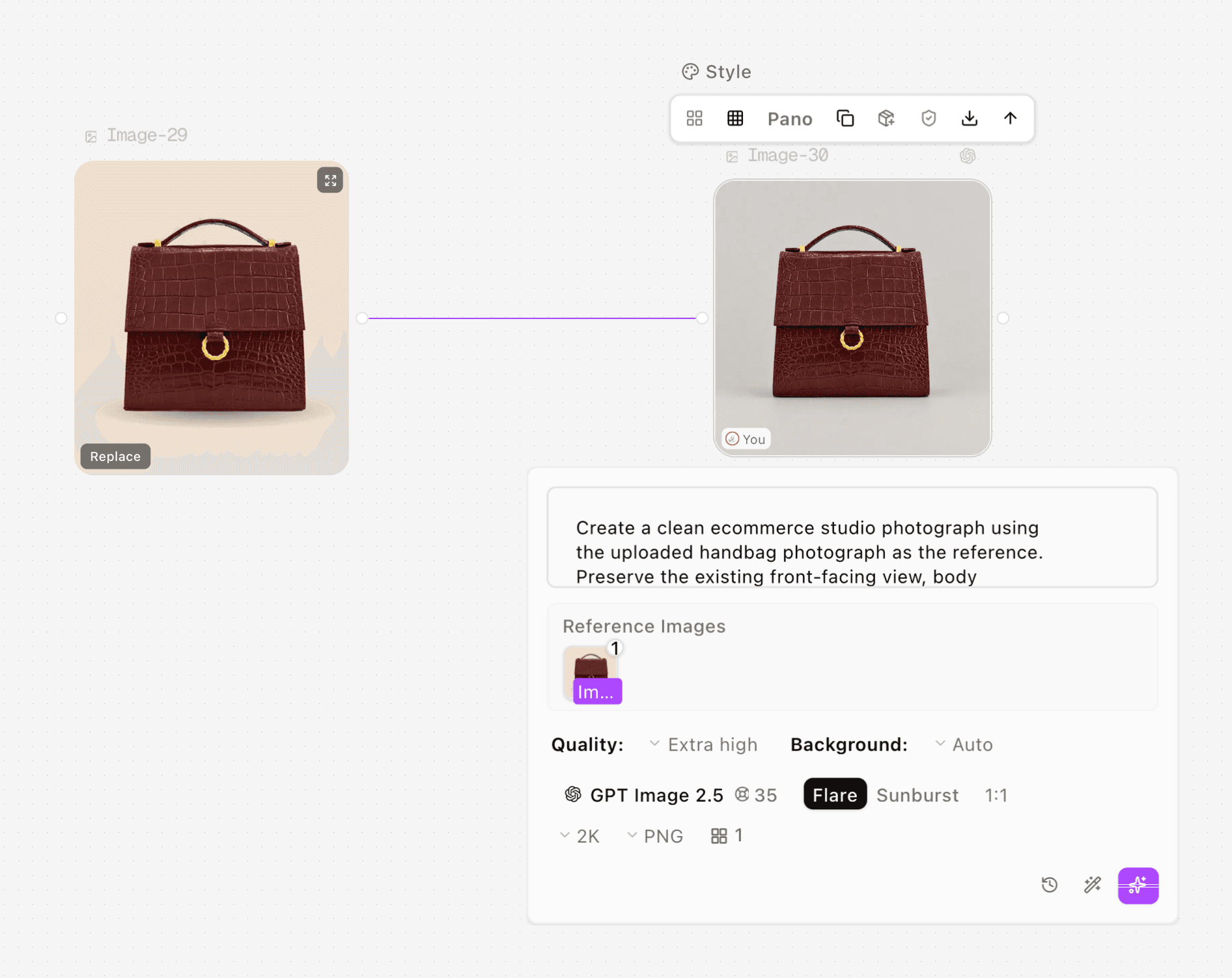
Figure 2. Clara’s first studio request uses the original bag reference, with the selected model and square settings visible.
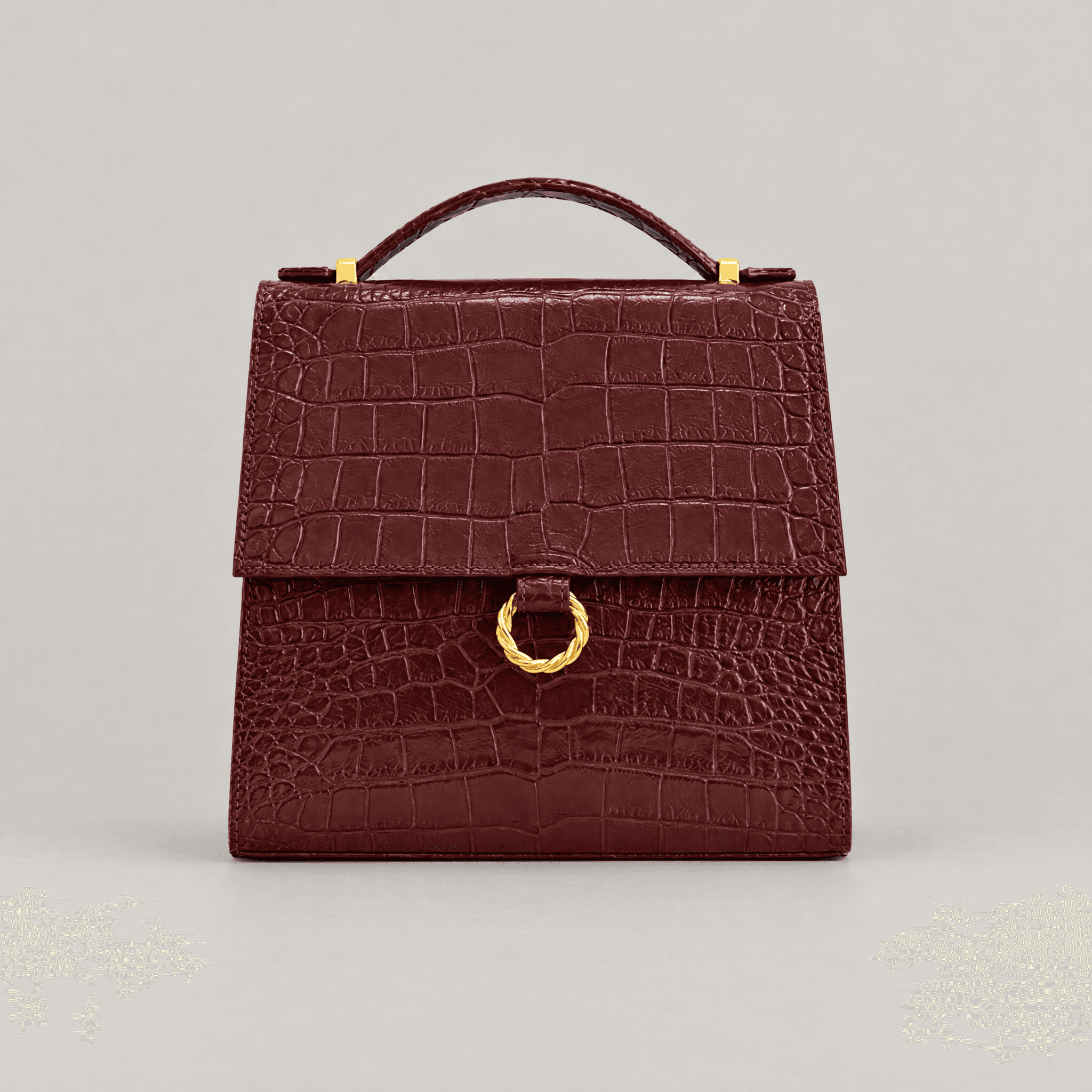
Figure 3. First studio export, 2048 × 2048 pixels. Check embossing, stitching and the twisted ring against the source.
What the Background Revision Actually Shows
In the first export, the major embossing blocks and front arrangement remain recognizable. Fine grain, stitching and twists in the gold-colored ring are more explicit than in the source and show regeneration. The candidate cannot be treated as an unchanged photograph of the product.
Clara then used a more restrictive background brief. The second retained screenshot still shows the original bag connected to the gray-background output; its prompt panel includes wording against redrawing or strengthening texture. The two exports remain available for comparison.
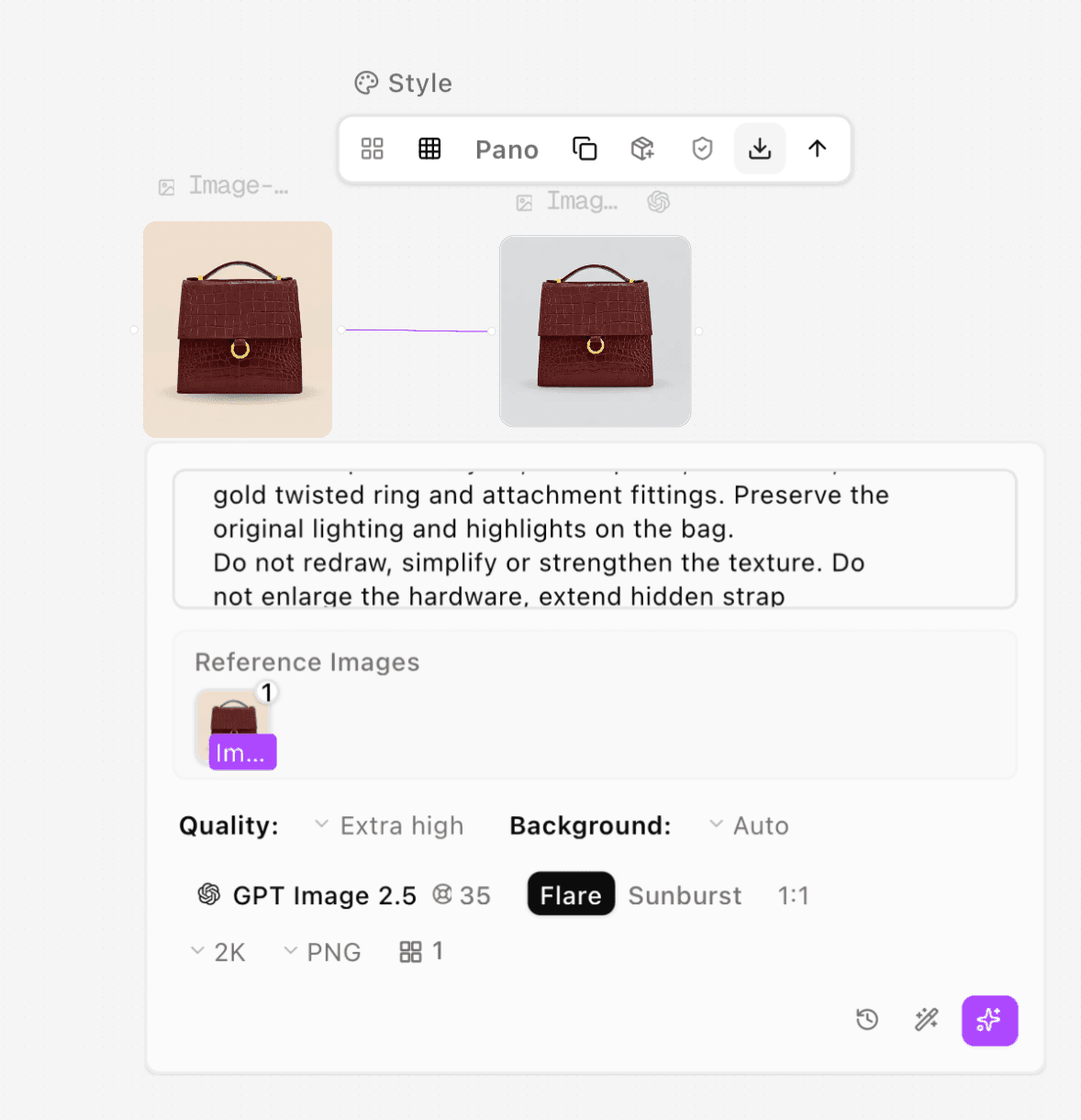
Figure 4. Clara’s revised background request. The original bag remains connected; the visible prompt excerpt restricts texture changes.
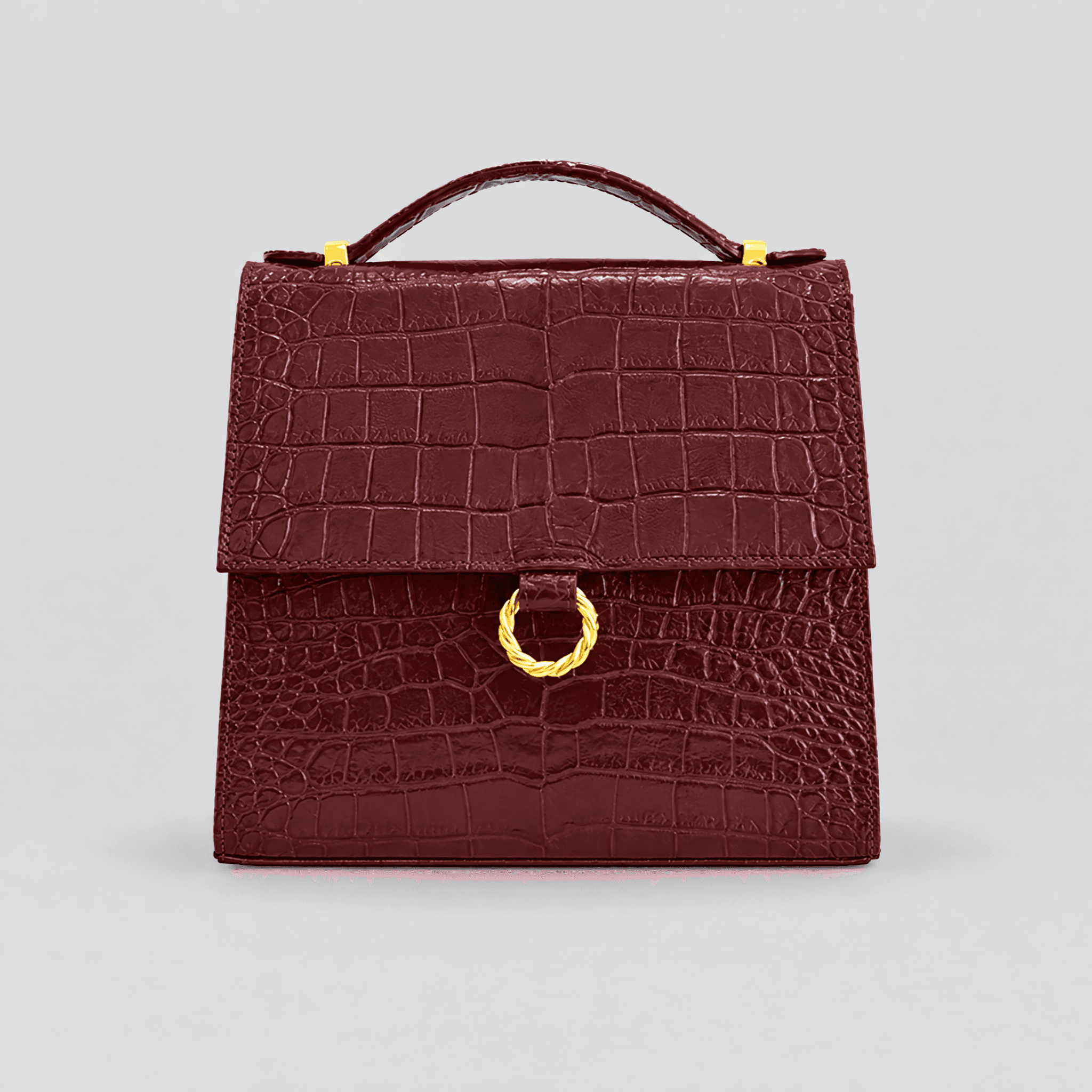
Figure 5. Revised-background export, 2048 × 2048 pixels. It does not establish pixel preservation or an unchanged product.
The revision did not establish that the product pixels or fine details were preserved. Larger pattern regions remain recognizable, while small grain, stitching and hardware still need exact comparison. The practical lesson is to check the export rather than approve a preservation instruction by its wording alone.
Inspect Texture, Hardware, Structure and Proportion
Review area | Use the source to check | Reject or investigate |
Texture | Larger embossing blocks, grain and seams | New scales, intensified relief or a different surface material. |
Hardware | Ring shape, attachment positions and metal appearance | Enlarged fittings, new fasteners or invented opening behavior. |
Structure | Flap outline, gusset, base and visible strap attachments | Changed panels, collapsed sides or unsupported strap construction. |
Proportion | Relative positions and silhouette in the same view | A visibly changed body or strap arrangement; verify with a suitable real view. |
Configuration | The actual accessories and carrying arrangement | Added straps, unseen pockets or implied included items. |
Compare at the same apparent bag size, then inspect fine detail at 100%. Use actual manufacturer dimensions in the product copy or a separately designed dimension graphic. Do not estimate centimeters from a perspective image or assume the listed height includes the arranged strap.
For a carry image, check the strap’s real usable length, connection points, gravity and position on the body. A plausible person holding a plausible bag does not validate the bag’s dimensions. No on-model or carry generation was tested in this article; use a real carry photograph when scale is important to the purchase.
Use a Protected Product Layer for Strict Preservation
When exact unit texture or hardware is essential, prepare the background separately. Isolate the real bag photograph, keep it on a protected layer and place it over the new scene. Inspect the mask around the strap, ring and flap; adjust the surrounding shadow without repainting the bag. This is a recommended finishing route, not a tested result of Clara’s two generation requests.
Preserving the photographed product also limits the camera angle and lighting changes you can make convincingly. Choose a background compatible with that source rather than forcing the bag into a radically different perspective. If you need an interior or back view, photograph it. Do not generate hidden construction for a factual product detail.
Save the approved master with SKU, view and revision in the filename. Make web derivatives separately, write alt text for the actual view and check the gallery at thumbnail size. Use the general product photography guide for the wider reference workflow, and keep this bag-specific checklist beside the final approval files.
Troubleshoot the Feature That Changed
If embossing is exaggerated, remove enhancement language and simplify the lighting. If the ring changes, use a sharper real hardware reference or preserve the original photographed fitting. If a strap floats or changes structure, return to the actual photographed arrangement rather than asking for another unsupported carrying pose. Inspect a newly exported result before marking any fix successful.
For upload or generation errors, check the file opens correctly, confirm the selected node’s accepted inputs and verify its source connection. Save any error and actual account charge before another request. The supplied background revision is documented above; the other remedies in this section have not been retested here.
FAQS
Does “change only the background” guarantee the bag stays identical?
No. It is an instruction to evaluate, not proof of preservation. The supplied revision still required product-detail review. Use a protected real product layer when unchanged detail is essential.
Is Croco Chocolat made from crocodile skin?
The official Joséphine page describes crocodile-embossed cowhide. The visual pattern should not be used to infer a different animal material. [1]
Can I show the decorative ring opening the bag?
That would misrepresent this product. Fauvette identifies the ring as decorative and the closure as magnetic. Use actual mechanism references for any opening or detail sequence. [1]
Can one front photograph provide the interior and back views?
It can support inferred concepts, but it does not document those hidden surfaces. Add real photographs for views intended to explain the bag’s construction or capacity.
Ready to try it on the canvas?
Open Astorie and fan your prompt across every frontier model in one workflow.